CI/CD (Continuous Integration / Continuous Deployment)
CI/CD – Complete Learning Guide for Hyperautomation & Full-Stack Development
CI/CD (Continuous Integration/Continuous Deployment) represents the automation of the software delivery pipeline, transforming how development teams build, test, and release applications. Continuous Integration (CI) focuses on developers frequently merging code changes into a central repository with automated builds and tests, enabling rapid detection of integration issues. Continuous Deployment (CD) automates infrastructure provisioning and application release, ensuring software can be deployed to production automatically when quality gates are met.[1][2][3][4]
In the hyperautomation context we've explored—combining RPA, generative AI, low-code platforms, Databricks, and Kotlin backend services—CI/CD becomes the critical infrastructure enabling these complex automation systems to evolve, improve, and scale reliably.[5][6][7]
Why CI/CD Matters for HyperautomationHyperautomation platforms are not static—they continuously evolve through:
- Rapid Iteration: Machine learning models improve with retraining; RPA bots adapt to process changes; automation logic refines through A/B testing
- Frequent Deployments: Updates deploying daily or hourly to production while maintaining zero downtime
- Safety at Scale: Ensuring changes to automation affecting thousands of concurrent processes don't cause cascading failures
- Cross-Team Collaboration: Data scientists, automation engineers, Kotlin backend developers, and DevOps teams working simultaneously without stepping on each other[5][6]
CI/CD enables all of this through automation, testing gates, and safe deployment strategies.
The Four Core Stages of CI/CD Pipelines
Stage 1: Source Control - The foundation. All code (application code, IaC, automation scripts, ML models) lives in Git repositories with clear versioning. When developers push code, webhooks automatically trigger the pipeline.[1][2][3][4]
# Example: Trigger on code push
on:
  push:
    branches: [main, develop]
  pull_request:
    branches: [main]
Stage 2: Build - Automated compilation and packaging.[2][3][8]
- Dependency Resolution: Download required libraries and packages
- Compilation: Compile code to bytecode (Java/Kotlin → JVM bytecode)
- Static Analysis: Code quality checks, linting, security scanning
- Artifact Generation: Create deployable artifacts (JAR files, Docker images, Python packages)
Tools: Maven, Gradle, Docker, npm, pip
# Example: Building a Docker image for Kotlin microservice
FROM openjdk:17-slim
COPY build/libs/automation-service-1.0.jar app.jar
ENTRYPOINT ["java", "-jar", "app.jar"]
Stage 3: Test - Comprehensive validation through multiple test layers:[8][9][10][2]
- Unit Tests (60% of test pyramid): Test individual functions in milliseconds
- Integration Tests (30%): Validate components working together
- E2E Tests (7%): Test complete user workflows
- Security Tests (continuous): SAST, dependency scanning, container scanning
- Performance Tests: Load testing, benchmark comparisons
Tools: JUnit, pytest, Selenium, SonarQube, Snyk, Trivy
// Example: Unit test in Kotlin
@Test
fun testWorkflowExecution() = runTest {
val result = workflowService.execute(testWorkflow)
assert(result.status == "completed")
}

```The **Testing Pyramid** shows optimal distribution: Fast, cheap unit tests form the base (catch most bugs quickly), integration tests in the middle (catch cross-component issues), and expensive E2E tests at the top (catch user-facing issues).
**Stage 4: Deploy** - Automated release to production with safety mechanisms.[2][8][11][7]
- **Staging Deployment**: Deploy to staging environment mirroring production
- **Smoke Tests**: Quick tests verifying basic functionality
- **Approval Gates**: Manual approval for critical changes (if configured)
- **Production Deployment**: Gradual rollout using safe deployment strategies
- **Post-Deployment Monitoring**: Verify application health, collect metrics
### Deployment Strategies: Safety vs. Speed

Organizations must choose deployment strategies balancing risk and speed:
**All-at-Once (Big Bang)**: Replace all instances simultaneously.[11][7]
- ✅ Simplest approach
- ❌ High risk—if issues arise, all users affected
- ❌ Rollback takes time
- Best for: Low-traffic systems, development/test environments
**Rolling Deployment**: Gradually replace instances (25% → 50% → 75% → 100%).[7][11]
- ✅ Zero downtime through load balancing
- ✅ Issues caught incrementally
- ❌ Database schema changes complicated
- ❌ Mixed version compatibility needed
- Best for: Traditional applications with gradual rollout
**Blue-Green Deployment**: Maintain two identical environments; switch traffic after validation.[11][7]
- ✅ Instant rollback by switching back
- ✅ Complete testing before switch
- ❌ Requires double infrastructure
- ✅ Best for mission-critical systems
- Best for: Financial systems, critical automation services
**Canary Release**: Deploy to small percentage (5%), monitor, then expand (10% → 50% → 100%).[7][11]
- ✅ Minimal user impact if issues arise
- ✅ Real traffic validates changes
- ✅ Automatic rollback on anomalies
- ✅ Best for machine learning model updates
- Best for: AI/ML-powered automation, customer-facing features
**Shadow Deployment**: New version runs parallel to old version; shadow traffic mirrors real traffic but doesn't affect real users.
- ✅ No user risk whatsoever
- ✅ Longest testing time
- ❌ Double resource consumption
- Best for: Critical ML model validation
**Feature Flags**: Toggle features on/off without deployment.
- ✅ Gradual rollout per user segment/region
- ✅ Instant disable if issues arise
- ✅ A/B testing without multiple deployments
- ✅ Perfect for hyperautomation experimentation
- Best for: Experimentation, gradual RPA bot rollouts
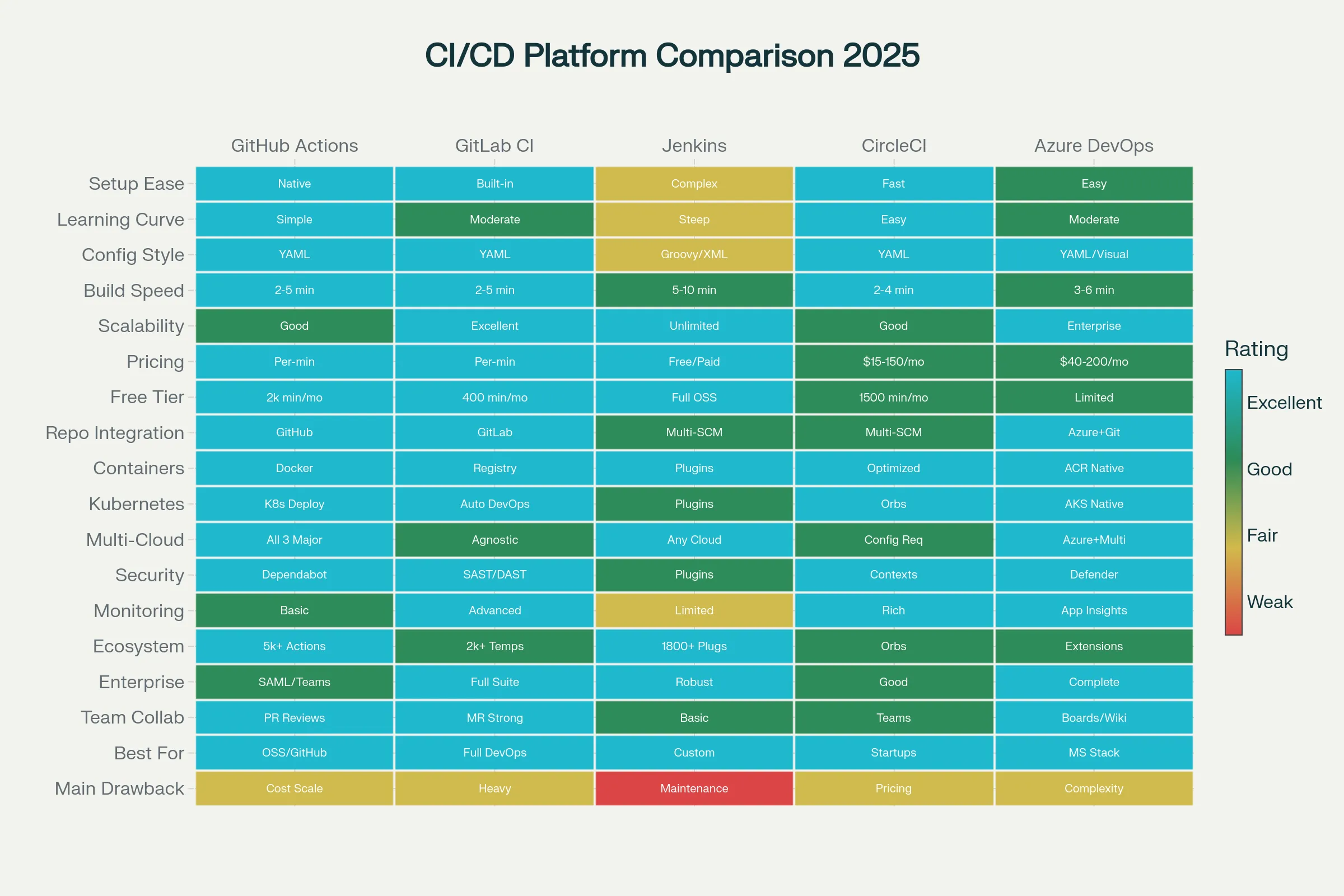
### CI/CD Platforms Comparison: Choosing the Right Tool**GitHub Actions** dominates for GitHub-based projects.[12][13]
- ✅ **Simplicity**: Event-driven model, straightforward YAML
- ✅ **GitHub Integration**: Seamless with repositories, pull requests
- ✅ **Marketplace**: 10,000+ pre-built actions
- ✅ **Free Tier**: 2,000 minutes/month free
- ❌ **Build Speed**: Slower than dedicated CI platforms
- ❌ **Cost**: Can escalate with high usage
- ✅ **Best For**: GitHub-hosted projects, small-to-medium teams, startups
```yaml
# Example: GitHub Actions workflow for Kotlin microservice
name: CI/CD Pipeline
on:
push:
branches: [main]
pull_request:
branches: [main]
jobs:
build:
runs-on: ubuntu-latest
steps:
- uses: actions/checkout@v3
- uses: actions/setup-java@v3
with:
java-version: '17'
- run: ./gradlew build
- run: ./gradlew test
- uses: sonarsource/sonarcloud-github-action@master
env:
GITHUB_TOKEN: ${{ secrets.GITHUB_TOKEN }}
SONAR_TOKEN: ${{ secrets.SONAR_TOKEN }}
GitLab CI provides the most integrated DevOps platform.[13][12]
- ✅ All-in-One: CI/CD, repository, registry, monitoring in one platform
- ✅ Performance: Consistently fastest build times
- ✅ Container-Native: First-class Docker support
- ✅ Auto DevOps: Automatic pipeline generation
- ✅ Cost: Predictable SaaS pricing
- ❌ Complexity: Steeper learning curve
- ✅ Best For: Enterprises wanting integrated platform, container-heavy workloads
Jenkins remains the most flexible for complex requirements.[12]
- ✅ Flexibility: 2000+ plugins cover virtually any tool
- ✅ Scalability: Distributed architecture for massive scale
- ✅ Control: Full customization possible
- ❌ Maintenance: Requires DevOps expertise
- ❌ Learning Curve: Steep; requires understanding Groovy
- ✅ Best For: Enterprise with complex requirements, scale demands (LinkedIn runs 100,000+ jobs/day)
CircleCI emphasizes performance and developer experience.[12]
- ✅ Speed: Fastest build times for containerized apps
- ✅ Resource Classes: Fine-grained CPU/RAM options
- ✅ Docker Caching: Advanced layer caching
- ✅ Excellent UX: Intuitive interface
- ❌ Cost: Credit-based pricing can escalate
- ✅ Best For: Performance-critical builds, Docker-heavy workloads
Azure DevOps for Microsoft-ecosystem organizations.[12]
- ✅ Integration: Native with Azure services, Office 365
- ✅ Enterprise Ready: Strong compliance features
- ✅ Repository Options: Git or TFVC
- ❌ Learning Curve: Moderate complexity
- ✅ Best For: Microsoft-invested enterprises
CI/CD Best Practices for Hyperautomation1. Version Everything - Code, Infrastructure, and Configuration[1][5][14]
Infrastructure as Code (IaC) defines infrastructure in version-controlled files:
# Example: Terraform for automating infrastructure
resource "aws_lambda_function" "process_workflow" {
  filename      = "lambda_function.zip"
  function_name = "process-workflow"
  role          = aws_iam_role.lambda_role.arn
  handler       = "index.handler"
  runtime       = "nodejs18.x"

  environment {
    variables = {
      DATABRICKS_HOST = var.databricks_host
      DATABRICKS_TOKEN = var.databricks_token
    }
  }
}
Benefits: Infrastructure changes tracked like code, reproducible environments, easy disaster recovery.[5][15][16][17]
2. Automate Everything Possible[2][14][1][5]
- ✅ Builds: Automated on every commit
- ✅ Testing: Unit, integration, security tests run automatically
- ✅ Deployment: Infrastructure provisioned automatically
- ✅ Monitoring: Observability deployed automatically
The principle: If a human repeats it, automate it.
3. Fail Fast and Frequently[3][10][2][5]
Quick feedback loops enable rapid iteration:
- Unit tests run in seconds → developers know immediately if code is broken
- Integration tests in minutes → catch cross-component issues early
- Deploy to staging → full validation before production
- Production canary → catch issues in real environment with minimal impact
4. Implement Robust Testing Strategy[9][14][10]
The testing pyramid distributes tests by speed/cost:
- 60% Unit Tests: Fast, cheap, highest ROI
- 30% Integration: Medium cost, medium ROI
- 7% E2E: Slow, expensive, low ROI (use sparingly)
- 3% Manual: Use only for high-risk changes
// Example: Kotlin integration test with testcontainers
@Container
companion object {
    val mongoDbContainer = MongoDBContainer("mongo:5.0")
}

@Test
fun testWorkflowStorage() = runTest {
    val workflowRepository = WorkflowRepository(mongoDbContainer.mongoClient)
    val workflow = Workflow(id = "workflow1", status = "completed")

    workflowRepository.save(workflow)
    val retrieved = workflowRepository.findById("workflow1")

    assertEquals(workflow.status, retrieved?.status)
}
5. Security Scanning at Every Stage[8][14][5][9]
- SAST (Static Analysis): Scan code for vulnerabilities before execution
- Dependency Scanning: Check libraries for known vulnerabilities
- Container Scanning: Scan Docker images for vulnerabilities
- Secret Detection: Prevent accidentally committing passwords/tokens
- DAST (Dynamic Analysis): Runtime security testing
# Example: Security scanning in pipeline
security_scan:
  stage: test
  script:
    - snyk test --severity-threshold=high  # Dependency scanning
    - trivy image myregistry/automation-service:latest  # Container scanning
    - sonarqube-scanner -Dsonar.projectKey=automation  # SAST
6. Optimize for Speed Without Sacrificing Quality[12][14][5][8]
- Parallel Testing: Run independent tests simultaneously
- Build Caching: Cache dependencies, compilation results
- Right-Sizing Resources: Allocate appropriate CPU/memory per job
- Smart Test Selection: Run only tests affected by changes
- Incremental Builds: Rebuild only changed components
7. Implement Approval Gates for Critical Changes[14][16][8]
For hyperautomation systems affecting critical business processes:
# Example: Manual approval before production
deploy_production:
  stage: deploy
  script:
    - ./deploy-to-production.sh
  when: manual  # Requires manual approval
  environment:
    name: production
    url: https://automation.company.com
CI/CD for Hyperautomation: Real-World Example
Imagine deploying an improved ML model for customer churn prediction RPA workflow:
Stage 1: Development
- Data scientist trains new model, tests on historical data
- Commits code to
feature/churn-model-v2branch - GitHub Actions triggers pipeline automatically
Stage 2: Automated Testing
- Unit tests verify model training code (10 seconds)
- Integration tests validate model with data pipeline (1 minute)
- Model accuracy compared to baseline → must be >95%
- If fails: Developer notified immediately, can fix
Stage 3: Staging Deployment
- Model deployed to staging environment
- RPA bots use model on historical test data
- Predictions compared to expected outcomes
- Performance tested under load
Stage 4: Canary Release
- Model deployed to 5% of production bots
- Predictions monitored for anomalies
- If all metrics green: Expand to 10% → 25% → 50% → 100%
- If anomalies detected: Automatic rollback to previous model
Stage 5: Continuous Monitoring
- Monitor prediction accuracy in real-time
- Track model drift (when new data differs from training data)
- If accuracy drops: Alert engineers, trigger retraining pipeline
- Historical versions available for instant rollback
This entire process—commit to full production deployment with real-time monitoring—happens automatically, safely, and reliably.[5][6][15][7]
CI/CD for Kubernetes and Cloud-Native Deployment
Modern hyperautomation platforms typically deploy to Kubernetes, requiring specific CI/CD considerations:[11][7][18]
# Example: Deploying Kotlin microservice to Kubernetes via GitLab CI
stages:
  - build
  - test
  - push
  - deploy

build:
  stage: build
  image: gradle:7.0
  script:
    - gradle build
    - ls build/libs/

test:
  stage: test
  image: gradle:7.0
  script:
    - gradle test

push_image:
  stage: push
  image: docker:latest
  script:
    - docker build -t $CI_REGISTRY_IMAGE:$CI_COMMIT_SHA .
    - docker login -u $CI_REGISTRY_USER -p $CI_REGISTRY_PASSWORD $CI_REGISTRY
    - docker push $CI_REGISTRY_IMAGE:$CI_COMMIT_SHA

deploy_kubernetes:
  stage: deploy
  image: bitnami/kubectl:latest
  script:
    - kubectl set image deployment/automation-service
        automation-service=$CI_REGISTRY_IMAGE:$CI_COMMIT_SHA
    - kubectl rollout status deployment/automation-service
Key Kubernetes CI/CD considerations:
- Container Images: Every build produces an immutable Docker image
- GitOps: Kubernetes manifests stored in Git, deployed via tools like Argo CD
- Zero-Downtime Deployments: Leveraging Kubernetes rolling updates or blue-green strategies
- Health Checks: Kubernetes verifies pod health, automatically rolls back if unhealthy
- Scaling: Horizontal pod autoscaling adjusts replicas based on load
Conclusion
CI/CD transforms hyperautomation from manual, error-prone operations to reliable, rapid, safe continuous delivery. By automating testing, security scanning, and deployment, organizations can:
- Deploy multiple times daily without fear
- Fix issues in production within minutes rather than hours
- Scale to thousands of concurrent automation processes safely
- Enable continuous improvement of ML models and automation logic
- Reduce manual toil on deployment and infrastructure management
- Maintain security and compliance through automated gates
For organizations implementing hyperautomation at scale—combining Kotlin microservices, Databricks data pipelines, RPA bots, generative AI models, and intelligent document processing—CI/CD becomes the nervous system enabling the entire intelligent automation organism to function, adapt, and improve continuously.[1][5][6][7][14]
The choice of CI/CD platform matters, but implementation discipline matters more. Teams must commit to automation, comprehensive testing, security scanning, and safe deployment strategies. Those that master CI/CD gain competitive advantages through speed, reliability, and agility that become increasingly difficult for competitors to match.